

AlarmWatch is an alarm system performance dashboard, for effective control of operations.
Improve SCADA alarm system performance, for effective control of operations.
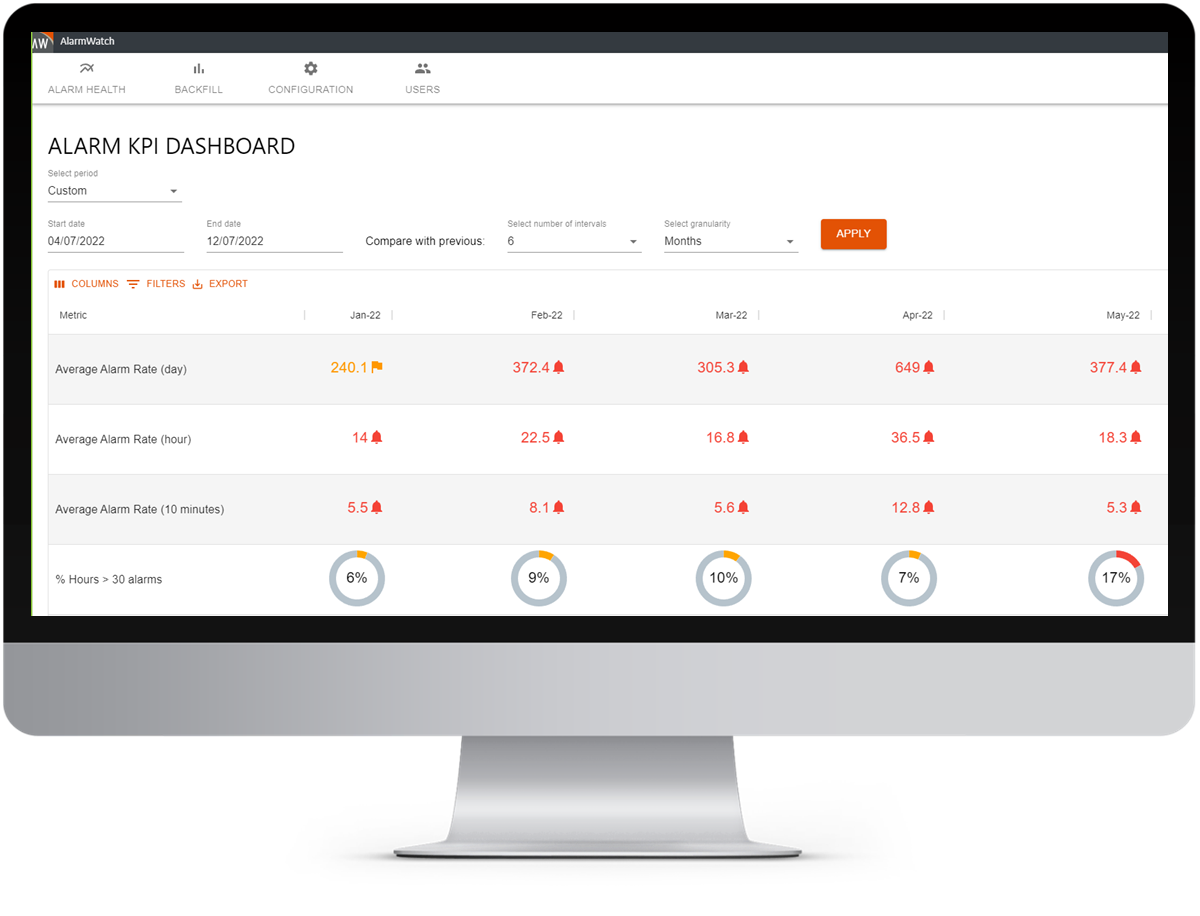
AlarmWatch KPI Dashboard
Top 5 Reasons to use AlarmWatch
- Pre-built, cost-effective, and ready-to-go solution.
- Benchmark your entire SCADA alarm system performance, at install.1
- Quickly identify 'Bad Actors' or nuisance alarms i.e. chattering alarms.
- Reduce alarm floods and operator alarm load by 50% in less than 2 months.2
- Improve overall performance, plant safety, compliance, productivity and profitability.
AlarmWatch Overview
AlarmWatch for Proficy iFIX is a dynamic alarm system analytics software, for ongoing performance monitoring and SCADA optimization.
Designed for Engineering (SCADA) Managers to gauge and optimize alarm system performance, reduce operator alarm load and achieve ISA 18.2 compliance.
AlarmWatch aggregates Proficy iFIX and Proficy Historian alarm and event data, analyzes the alarm data against ISA 18.2 recommended best practise standards and displays the alarm performance summary on an interactive dashboard - the ‘AlarmWatch KPI Dashboard’.
This ready-to-go solution allows managers to:
- View total alarm system performance in seconds.
- Identify SCADA system problem areas and opportunities for change e.g. ‘Bad Actors’ or nuisance alarms.
- Drill-down for detailed investigation, and metric root cause analysis.
- Take action in a targeted and cost-effective way.
- Track alarm system improvements.
- Monitor and receive ongoing insights for systems and process optimization, to achieve alarm management and operational goals.
Key Features
| Ready-to-go solution | No report design, coding or hands-on training required. |
| Quick & easy install | No project managers or engineers required.* |
| iFIX connectivity | Readily connected to iFIX or Proficy Historian alarm and event records via iFIX Productivity Tools, iPower or Proficy Historian. |
| Up-to-date display | Automated collection and aggregation of alarm information, providing up-to-date alarm performance information on a daily basis. |
| Alarm KPI Dashboard | At-a-glance alarm system health, including ISA 18.2 section 16 benchmarking (default) or custom thresholds. |
| Easy to use | An intuitive product with a simple web user-interface, minimal to no training required. |
| Quality data & reporting | Built-in data quality checks. |
| Drill-down function | Interactive drill-down function allows user to easily identify a metric's root cause, right down to individual alarm records. |
| Leverage data history | Back-fill mechanism allows historic data to be uploaded from approved sources, including during server downtime |
| Secure data | Tamper-proof software, means unauthorized changes to alarm and event data cannot go unnoticed. |
*Variable depending on your system architecture and chosen method of implementation.
Key Benefits
This simple, yet sophisticated software tool provides important benefits for SCADA Managers and automation companies:
|
Improve safety |
Reduce operator overload and enhance plant safety by reducing alarm 'noise' and improving operator's situational awareness. Enable engineers and operators to be more responsive, save time from traditional reporting tasks and reduce incidents. |
|
Increase performance |
Improve alarm system and operator performance by eliminating nuisance alarms and optimizing your alarm system design. |
|
Achieve compliance |
Reduce business risk and improve compliance with industry standards / best practice benchmarking (ISA 18.2, section 16). |
|
Boost productivity |
Increase plant-wide productivity by reducing noise and improving system and operator performance. |
|
Optimize your system |
Gain business insights and contribute to continuous improvement initiatives and operational excellence with ongoing monitoring and KPI reporting. |
|
Low cost / high impact approach |
Utilizing an alarm ‘Monitoring and Assessment’ tool is a relatively cost-effective way to improve overall alarm management. No implementation costs and none to minimal training required. |
|
Save time & money |
Easily identify problematic (high impact) areas from the AlarmWatch KPI Dashboard, enabling managers to effectively prioritise tasks and resources; saving time and money on valuable engineering resources. |
Alarm Management & ISA 18.2
The progression of automation processes and changing technologies has led to alarm overload becoming a widespread issue. The benefits of effective alarm management are often underestimated. A well-designed alarm system which is monitored and optimized over time will improve a plant’s safety, machine and alarm system performance, and increase a plant’s productivity – all affecting your bottom line.
ISA 18.2 is an alarm management safety standard developed by and for several automation industries including; chemical, pipeline, petrochemical, pharmaceutical, mining and metals, power, and manufacturing industries. It focuses on operator safety for SCADA systems and presents the ‘Alarm Management Lifecycle’ as a guideline for the requirements to implement and effectively manage an alarm system.
ISA 18.2 recommends ‘Monitoring and Assessment’ as one of the best places to start to understand and improve your alarm management practices. Alarm Monitoring and Assessment tools can highlight problem areas in order to reduce ‘noise’ and improve alarm system performance, provide insights for maintenance and alarm rationalization and support an operator’s ability to respond effectively, reducing incidents.
AlarmWatch supports effective alarm management and system design, enabling mangers to:
- Minimise alarm noise to reduce operator overload and improve alarm performance and safety.
- Identify system issues and prioritise maintenance tasks.
- Scope and prioritize activities for alarm rationalization projects, as well as provide insights for alarm rationalization decisions and process change.
- Provide quantitative data for auditing purposes.
- Continuously monitor and gain business insights for continuous improvements initiatives.
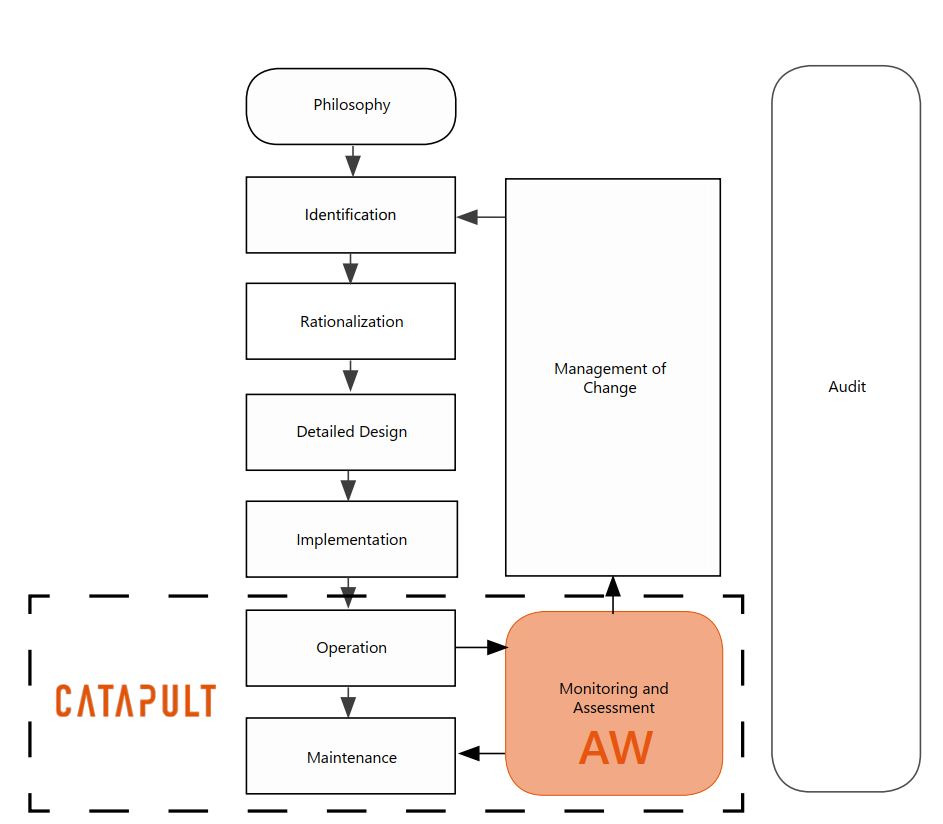
Alarm Management Lifecycle (ANSI/ISA 18.2, 2009)

Frequently Asked Questions
What is AlarmWatch?
AlarmWatch is SCADA alarm analytics software developed by Catapult Software. It collects alarm data from Proficy iFIX, benchmarks it against ISA 18.2 best practice standards, displaying the results on an interactive dashboard ‘AlarmWatch KPI Dashboard’, so managers get at a glance insight on their alarm system performance.
How does AlarmWatch work?
AlarmWatch collects real-time alarm and event records from Proficy iFIX or Proficy Historian, using iFIX Productivity Tools, iPower or Proficy Historian A&E collector. It analyzes them against ISA 18.2 standards, and updates the dashboard daily. Managers can drill down to individual alarm records.
What is a bad actor alarm?
A bad actor, also known as a ‘nuisance alarm’, is an alarm that accounts for a disproportionate share of alarm activity (high frequency) or spends an unnecessary amount of time in its alarm state, such as a Chattering Alarm that keeps switching in and out of alarm state. These alarms build operator alarm load often without benefit. AlarmWatch identifies bad actors quickly, so you can target fixes where they matter most.
What is ISA 18.2?
ISA 18.2 is an alarm management safety standard developed for industries including power, pipeline, chemical, mining and manufacturing. It focuses on operator safety and describes an alarm management lifecycle. AlarmWatch automatically benchmarks system alarm performance against ISA 18.2 recommended metrics.
How much alarm data does AlarmWatch need?
ISA 18.2 recommends at least one month of alarm data to assess alarm system performance. AlarmWatch’s back-fill feature enables a user to upload historic data for instant results.
Can AlarmWatch reduce alarm floods?
AlarmWatch helps you find the nuisance alarms behind alarm floods so you can fix them. In a published case study, PowerNet, an electricity distributor, recorded these results in its first three months: chattering alarms cut 55%, stale alarms down 68%, operator alarm load down 30% and time in alarm flood condition down 58%.
Do I need engineers to install AlarmWatch?
AlarmWatch is designed as a ready-to-go solution with no report design, coding or hands-on training required. No project managers or engineers are required for installation, though this may vary based on your system architecture and chosen method of implementation.
How can I book an AlarmWatch demo?
Contact Catapult Software or your local iFIX Representative to book an AlarmWatch demo or ask questions. You can call 1 888 489 9949 (US and Canada toll free) or +64 9 489 9944. AlarmWatch launched in the USA and New Zealand at the end of 2020.
Find out more
If you are new to Alarm Management practices or require an easy and cost-effective solution for ongoing alarm system performance monitoring, compliance or continuous improvement – AlarmWatch could be the solution for you.
To book an AlarmWatch demo or if you would like to know more, please contact us or your local Velotic Representative.
Check our announcement about the AlarmWatch for iFIX launch.