

Enables redundant system configuration and automatic fail-over for high availability operations.
Overview
Enables redundant system configuration and automatic fail-over for high availability operations. SRM-2 provides the reliability of two GE iFIX SCADA servers in a redundant configuration with automatic fail-over. SRM-2 is required when your iFIX system includes processes that cannot run simultaneously on both servers.
Key Features
The server redundancy is required when your iFIX system includes processes that cannot run simultaneously on both servers. For example:
- Dual iFIX SCADA servers sharing a single serial communications path to multiple RTUs and/or PLCs. Without SRM-2, communications drivers running simultaneously on the dual servers will fail by trying to compete for this single comms path.
- iFIX schedules need to run on just one server in a redundant pair to avoid duplicated actions.
- Third-party applications like Win911 Pager or Catapult OnDemand will create conflict if they run on two servers simultaneously.
How it works
SRM-2 ensures that communications drivers and critical processes run only on the preferred server, avoiding conflicts with processes running in two places at once. SRM-2 monitors the servers over single or dual LAN connections. Failure of a server triggers SRM-2 to automatically start the missing communications drivers and processes on the remaining server. iFIX alarms will alert users to the fail-over.
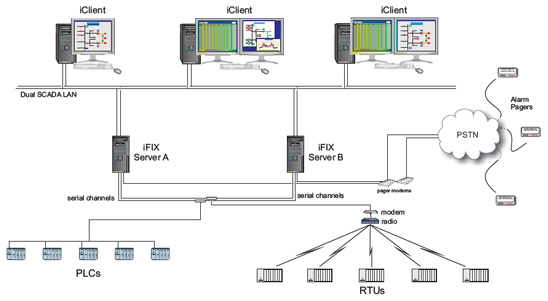
Typical configuration running SRM-2 for Proficy iFIX
Key Benefits
- Automation Interface - SRM-2 provides an (OLE) automation interface. This allows it to be controlled from within the iFIX Workspace environment using Visual Basic for Applications (VBA).
- Fail-over notification - iFIX alarms notify operators of fail-over incidents.
- Fail-over recording - In an iPower SCADA system, or iFIX system running Events, the migration of process between servers is recorded in the Events list.
Resources
Brochure
Click here to access the brochure.
Trial Demo
Please register your interest with us to access a trial download.
How to Buy
The Server Redundancy Module (SRM-2) is available directly from Catapult Software. Please contact us for pricing and availability.